
 SpringBoot 邮件服务 集成配置 详解
# 前言
本文以网易邮箱(及 163 邮箱)为例,展示如何为 SpringBoot 项目集成邮件服务,其他邮箱配置类似,可以自行查看 Spring Email 指南 (opens new window) 或是其他官方文档
# 授权码
首先我们需要获取授权码,用于后续配置,登录邮箱: https://mail.163.com/
点击顶端设置,之后选择 POP3/SMTP/IMAP 选项
POP3/SMTP 服务已开启 – 开启该服务,开启是需要验证手机号发送验证码。
验证完成会返回授权码,该授权码只显示一次,记得保存,否则需要重新发送验证码获取新的授权码
# 添加依赖
<dependency>
    <groupId>org.springframework.boot</groupId>
    <artifactId>spring-boot-starter-mail</artifactId>
</dependency>
2
3
4
# 配置文件
Spring Boot 为 JavaMailSender 提供了自动配置以及启动器模块。
spring:
  mail:
    default-encoding: UTF-8
    host: smtp.163.com # 网站发送邮件邮箱服务 host    port: 465
    username: xxx@163.com # 邮箱
    password: ONSWXXXXXXXX # 授权码
    protocol: smtp
    properties:
      mail:
        smtp:
          auth: 'true'
          socketFactory:
            class: com.rymcu.forest.util.MailSSLSocketFactory
#            class: javax.net.ssl.SSLSocketFactory
            port: 465
          ssl:
            enable: true
          starttls:
            enable: true
          stattls:
            required: true
          connectiontimeout: 5000
          timeout: 3000
          writetimeout: 5000
2
3
4
5
6
7
8
9
10
11
12
13
14
15
16
17
18
19
20
21
22
23
24
注意:上面的 password 不是你的邮箱密码,而是我们上一章节得到的授权码
相关参数介绍
default-encoding: 默认编码格式,这里设置为 UTF-8。host: SMTP 服务器的地址,这里是 163 邮箱的 SMTP 服务器地址。port: SMTP 服务器的端口,163 邮箱的 SMTP 端口是 465。username: 163 邮箱账号。password: 我们上面得到的授权码。protocol: 使用的协议,这里是 SMTP 协议。properties: 额外的属性设置。mail: 邮件相关的属性。smtp: SMTP 相关的属性。auth: 是否需要认证,这里设置为 true,表示需要认证。socketFactory: Socket 工厂相关设置。class: Socket 工厂类,表示使用 SSL 加密。port: Socket 工厂使用的端口,这里也是 465。
ssl: SSL 相关设置。enable: 是否启用 SSL,这里设置为 true,表示启用 SSL 加密。
starttls: STARTTLS 相关设置。enable: 是否启用 STARTTLS,这里设置为 true,表示启用 STARTTLS。
stattls: STARTTLS 相关设置。required: 是否要求 STARTTLS,这里设置为 true,表示要求 STARTTLS。
connectiontimeout: 连接超时时间,单位为毫秒,这里设置为 5000 毫秒(5 秒)。timeout: 操作超时时间,单位为毫秒,这里设置为 3000 毫秒(3 秒)。writetimeout: 写超时时间,单位为毫秒,这里设置为 5000 毫秒(5 秒)。
更多详细信息可以查看 Spring 官方文档:36. Sending Email (spring.io) (opens new window)
MailProperties 源码:MailProperties.java at v2.0.3.RELEASE (opens new window)
如果不想要给部分配置信息写在 application.yml 中,也可以直接硬编码在代码里
        Properties props = new Properties();
        // 表示SMTP发送邮件,需要进行身份验证
        props.put("mail.smtp.auth", true);
        props.put("mail.smtp.ssl.enable", true);
        props.put("mail.smtp.host", SERVER_HOST);
        props.put("mail.smtp.port", SERVER_PORT);
        // 如果使用ssl,则去掉使用25端口的配置,进行如下配置
        props.put("mail.smtp.socketFactory.class", "javax.net.ssl.SSLSocketFactory");
        props.put("mail.smtp.socketFactory.port", SERVER_PORT);
        // 发件人的账号,填写控制台配置的发信地址,比如xxx@xxx.com
        props.put("mail.user", USERNAME);
        // 访问SMTP服务时需要提供的密码(在控制台选择发信地址进行设置)
        props.put("mail.password", PASSWORD);
        // 配置
        mailSender.setJavaMailProperties(props);
2
3
4
5
6
7
8
9
10
11
12
13
14
15
还有就是大家可以注意到,上面指定端口为 465,这是因为 SMTP 服务默认的 25 端口阿里云默认是禁用状态,详情请看阿里云官方文档 (opens new window)
所以如果本地调试我们不指定 port 是没问题的,但是阿里云线上是无法通过端口 25 发送邮件的,建议直接指定指定 465 端口(使用 SSL),或是 80 端口(不使用 SSL)。虽然通过一定手段可以解封 25 端口,但是比较麻烦,且成功率不高
# 编写代码
注:代码部分来自仓库:rymcu/forest: forest(森林) (opens new window),同时进行了改动
# SSL 相关配置
本章节为需要使用 https 协议的相关配置,没有该需求这个小章节可以先跳过,给后面配置完后再来配置也没有影响,不过应该需要设置 spring.mail.properties.mail.smtp.ssl.enable=false 以此来关闭 ssl
MailSSLSocketFactory
package com.rymcu.forest.util;

import javax.net.SocketFactory;
import javax.net.ssl.SSLContext;
import javax.net.ssl.SSLSocketFactory;
import javax.net.ssl.TrustManager;
import java.io.IOException;
import java.net.InetAddress;
import java.net.Socket;

public class MailSSLSocketFactory extends SSLSocketFactory {
    private SSLSocketFactory factory;

    public MailSSLSocketFactory() {
        try {
            SSLContext sslcontext = SSLContext.getInstance("TLS");
            sslcontext.init(null, new TrustManager[]{new MailTrustManager()}, null);
            factory = sslcontext.getSocketFactory();
        } catch (Exception ex) {
            // ignore
        }
    }

    public static SocketFactory getDefault() {
        return new MailSSLSocketFactory();
    }

    @Override
    public Socket createSocket() throws IOException {
        return factory.createSocket();
    }

    @Override
    public Socket createSocket(Socket socket, String s, int i, boolean flag) throws IOException {
        return factory.createSocket(socket, s, i, flag);
    }

    @Override
    public Socket createSocket(InetAddress inaddr, int i, InetAddress inaddr1, int j) throws IOException {
        return factory.createSocket(inaddr, i, inaddr1, j);
    }

    @Override
    public Socket createSocket(InetAddress inaddr, int i) throws IOException {
        return factory.createSocket(inaddr, i);
    }

    @Override
    public Socket createSocket(String s, int i, InetAddress inaddr, int j) throws IOException {
        return factory.createSocket(s, i, inaddr, j);
    }

    @Override
    public Socket createSocket(String s, int i) throws IOException {
        return factory.createSocket(s, i);
    }

    @Override
    public String[] getDefaultCipherSuites() {
        return factory.getDefaultCipherSuites();
    }

    @Override
    public String[] getSupportedCipherSuites() {
        return factory.getSupportedCipherSuites();
    }
}
2
3
4
5
6
7
8
9
10
11
12
13
14
15
16
17
18
19
20
21
22
23
24
25
26
27
28
29
30
31
32
33
34
35
36
37
38
39
40
41
42
43
44
45
46
47
48
49
50
51
52
53
54
55
56
57
58
59
60
61
62
63
64
65
66
67
68
MailTrustManager
package com.rymcu.forest.util;

import javax.net.ssl.X509TrustManager;
import java.security.cert.X509Certificate;

public class MailTrustManager implements X509TrustManager {
    public void checkClientTrusted(X509Certificate[] cert, String authType) {
        // everything is trusted
    }

    public void checkServerTrusted(X509Certificate[] cert, String authType) {
        // everything is trusted
    }

    public X509Certificate[] getAcceptedIssuers() {
        return new X509Certificate[0];
    }
}
2
3
4
5
6
7
8
9
10
11
12
13
14
15
16
17
18
19
# 发送邮件
JavaMailService 定义邮件相关接口
public interface JavaMailService {
    /**
     * 发送验证码邮件
     *
     * @param email 收件人邮箱
     * @return 执行结果 0:失败1:成功
     * @throws MessagingException
     */
    Integer sendEmailCode(String email) throws MessagingException;

    /**
     * 发送找回密码邮件
     *
     * @param email 收件人邮箱
     * @return 执行结果 0:失败1:成功
     * @throws MessagingException
     */
    Integer sendForgetPasswordEmail(String email) throws MessagingException;

    /**
     * 发送下消息通知
     *
     * @param notification
     * @return
     * @throws MessagingException
     */
    Integer sendNotification(NotificationDTO notification) throws MessagingException;
}
2
3
4
5
6
7
8
9
10
11
12
13
14
15
16
17
18
19
20
21
22
23
24
25
26
27
28
JavaMailServiceImpl 邮件接口实现
@Service
public class JavaMailServiceImpl implements JavaMailService {

    /**
     * Java邮件发送器
     */
    @Resource
    private JavaMailSenderImpl mailSender;
    @Resource
    private RedisService redisService;
    @Resource
    private UserService userService;
    /**
     * thymeleaf模板引擎
     */
    @Resource
    private TemplateEngine templateEngine;

    @Value("${spring.mail.host}")
    private String SERVER_HOST;
    @Value("${spring.mail.port}")
    private String SERVER_PORT;
    @Value("${spring.mail.username}")
    private String USERNAME;
    @Value("${spring.mail.password}")
    private String PASSWORD;
    @Value("${resource.domain}")
    private String BASE_URL;

    @Override
    public Integer sendEmailCode(String email) throws MessagingException {
        return sendCode(email, 0);
    }

    @Override
    public Integer sendForgetPasswordEmail(String email) throws MessagingException {
        return sendCode(email, 1);
    }

    @Override
    public Integer sendNotification(NotificationDTO notification) throws MessagingException {
        User user = userService.findById(String.valueOf(notification.getIdUser()));
        if (NotificationConstant.Comment.equals(notification.getDataType())) {
            String url = notification.getDataUrl();
            String thymeleafTemplatePath = "mail/commentNotification";
            Map<String, Object> thymeleafTemplateVariable = new HashMap<String, Object>(4);
            thymeleafTemplateVariable.put("user", notification.getAuthor().getUserNickname());
            thymeleafTemplateVariable.put("articleTitle", notification.getDataTitle());
            thymeleafTemplateVariable.put("content", notification.getDataSummary());
            thymeleafTemplateVariable.put("url", url);

            sendTemplateEmail(USERNAME,
                    new String[]{user.getEmail()},
                    new String[]{},
                    "【RYMCU】 消息通知",
                    thymeleafTemplatePath,
                    thymeleafTemplateVariable);
            return 1;
        }
        return 0;
    }

    private Integer sendCode(String to, Integer type) throws MessagingException {
        SimpleMailMessage simpleMailMessage = new SimpleMailMessage();
        simpleMailMessage.setFrom(USERNAME);
        simpleMailMessage.setTo(to);
        if (type == 0) {
            Integer code = Utils.genCode();
            redisService.set(to, code, 5 * 60);
            simpleMailMessage.setSubject("新用户注册邮箱验证");
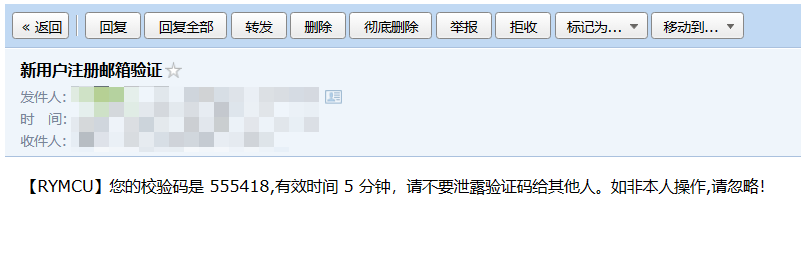
            simpleMailMessage.setText("【RYMCU】您的校验码是 " + code + ",有效时间 5 分钟,请不要泄露验证码给其他人。如非本人操作,请忽略!");
            mailSender.send(simpleMailMessage);
            return 1;
        } else if (type == 1) {
            String code = Utils.entryptPassword(to);
            String url = BASE_URL + "/forget-password?code=" + code;
            redisService.set(code, to, 15 * 60);

            String thymeleafTemplatePath = "mail/forgetPasswordTemplate";
            Map<String, Object> thymeleafTemplateVariable = new HashMap<String, Object>(1);
            thymeleafTemplateVariable.put("url", url);

            sendTemplateEmail(USERNAME,
                    new String[]{to},
                    new String[]{},
                    "【RYMCU】 找回密码",
                    thymeleafTemplatePath,
                    thymeleafTemplateVariable);
            return 1;
        }
        return 0;
    }

    /**
     * 发送thymeleaf模板邮件
     *
     * @param deliver                   发送人邮箱名 如: returntmp@163.com
     * @param receivers                 收件人,可多个收件人 如:11111@qq.com,2222@163.com
     * @param carbonCopys               抄送人,可多个抄送人 如:33333@sohu.com
     * @param subject                   邮件主题 如:您收到一封高大上的邮件,请查收。
     * @param thymeleafTemplatePath     邮件模板 如:mail\mailTemplate.html。
     * @param thymeleafTemplateVariable 邮件模板变量集
     */
    public void sendTemplateEmail(String deliver, String[] receivers, String[] carbonCopys, String subject, String thymeleafTemplatePath,
                                  Map<String, Object> thymeleafTemplateVariable) throws MessagingException {
        String text = null;
        if (thymeleafTemplateVariable != null && thymeleafTemplateVariable.size() > 0) {
            Context context = new Context();
            thymeleafTemplateVariable.forEach((key, value) -> context.setVariable(key, value));
            text = templateEngine.process(thymeleafTemplatePath, context);
        }
        sendMimeMail(deliver, receivers, carbonCopys, subject, text, true, null);
    }

    /**
     * 发送的邮件(支持带附件/html类型的邮件)
     *
     * @param deliver             发送人邮箱名 如: returntmp@163.com
     * @param receivers           收件人,可多个收件人 如:11111@qq.com,2222@163.com
     * @param carbonCopys         抄送人,可多个抄送人 如:3333@sohu.com
     * @param subject             邮件主题 如:您收到一封高大上的邮件,请查收。
     * @param text                邮件内容 如:测试邮件逗你玩的。 <html><body><img
     *                            src=\"cid:attchmentFileName\"></body></html>
     * @param attachmentFilePaths 附件文件路径 如:
     *                            需要注意的是addInline函数中资源名称attchmentFileName需要与正文中cid:attchmentFileName对应起来
     * @throws Exception 邮件发送过程中的异常信息
     */
    private void sendMimeMail(String deliver, String[] receivers, String[] carbonCopys, String subject, String text,
                              boolean isHtml, String[] attachmentFilePaths) throws MessagingException {
        StopWatch stopWatch = new StopWatch();

        stopWatch.start();
        MimeMessage mimeMessage = mailSender.createMimeMessage();
        MimeMessageHelper helper = new MimeMessageHelper(mimeMessage, true);
        helper.setFrom(deliver);
        helper.setTo(receivers);
        helper.setCc(carbonCopys);
        helper.setSubject(subject);
        helper.setText(text, isHtml);
        // 添加邮件附件
        if (attachmentFilePaths != null && attachmentFilePaths.length > 0) {
            for (String attachmentFilePath : attachmentFilePaths) {
                File file = new File(attachmentFilePath);
                if (file.exists()) {
                    String attachmentFile = attachmentFilePath
                            .substring(attachmentFilePath.lastIndexOf(File.separator));
                    long size = file.length();
                    if (size > 1024 * 1024) {
                        String msg = String.format("邮件单个附件大小不允许超过1MB,[%s]文件大小[%s]。", attachmentFilePath,
                                file.length());
                        throw new RuntimeException(msg);
                    } else {
                        FileSystemResource fileSystemResource = new FileSystemResource(file);
                        helper.addInline(attachmentFile, fileSystemResource);
                    }
                }
            }
        }
        mailSender.send(mimeMessage);
        stopWatch.stop();

    }

}
2
3
4
5
6
7
8
9
10
11
12
13
14
15
16
17
18
19
20
21
22
23
24
25
26
27
28
29
30
31
32
33
34
35
36
37
38
39
40
41
42
43
44
45
46
47
48
49
50
51
52
53
54
55
56
57
58
59
60
61
62
63
64
65
66
67
68
69
70
71
72
73
74
75
76
77
78
79
80
81
82
83
84
85
86
87
88
89
90
91
92
93
94
95
96
97
98
99
100
101
102
103
104
105
106
107
108
109
110
111
112
113
114
115
116
117
118
119
120
121
122
123
124
125
126
127
128
129
130
131
132
133
134
135
136
137
138
139
140
141
142
143
144
145
146
147
148
149
150
151
152
153
154
155
156
157
158
159
160
161
162
163
164
165
JavaMailServiceTest 单元测试
/**
 * javaMail测试
 */
class JavaMailServiceTest extends BaseServiceTest {

    private static final String REALITY_EMAIL = "xxxx@qq.com";
    @Autowired
    private JavaMailService javaMailService;

    @Test
    void sendEmailCode() throws MessagingException {
        assertEquals(1, javaMailService.sendEmailCode(REALITY_EMAIL));
    }

    @Test
    void sendForgetPasswordEmail() throws MessagingException {
        assertEquals(1, javaMailService.sendForgetPasswordEmail(REALITY_EMAIL));
    }

    @Test
    void sendNotification() throws MessagingException {
        assertEquals(0, javaMailService.sendNotification(new NotificationDTO()));

    }
}
2
3
4
5
6
7
8
9
10
11
12
13
14
15
16
17
18
19
20
21
22
23
24
25
最后我们测试上面发送验证码函数:sendEmailCode (上面的 xxxx@qq.com 替换为自己的收件人邮箱 )
最终发送成功
# 参考链接
- SpringBoot 集成 163 邮件发送详细配置,从 163 邮箱开始配置 (opens new window)
- SpringBoot 之发送邮件 | SPRING TUTORIAL (dunwu.github.io) (opens new window)
- SpringBoot 系列(十四)集成邮件发送服务及邮件发送的几种方式 (opens new window)
- 阿里云服务器不能发邮件禁用 25 端口的三种解决方法 (opens new window)
- Spring Boot 配置 ssl 发送 Email_mail.smtp.ssl.enable (opens new window)
- Spring Boot 发送邮件全解析 (opens new window)